How to Show and Hide Content
Most real LearnDash layouts need to show different things to different learners — enrolled users see course content, visitors see an enrollment prompt, completed learners see a certificate link. BeaverDash provides conditional field connections for exactly this purpose.
- Completed Field Connections in Beaver Themer
- A Beaver Themer layout you want to add conditional content to
How conditional connections work
BeaverDash conditional connections return true or false based on the current user's state. You use them inside Beaver Themer's [wpbb-if] tag to wrap content that should only show in certain conditions:
[wpbb-if post:bdash_condition]
  This content shows when the condition is true.
[/wpbb-if]
You can add an else case for the false state:
[wpbb-if post:bdash_condition]
  Content for true state
[wpbb-else]
  Content for false state
[/wpbb-if]
1. Show an enroll prompt to non-enrolled visitors
Add a Beaver Builder HTML module to your course template. Wrap an enrollment call to action in the visitor conditional:
[wpbb-if post:bdash_visitor]
  Enroll in this course to get started.
  [Place your Enroll button module here, or link to the enrollment page]
[/wpbb-if]
bdash_visitor returns true when the current user is not logged in or is not enrolled in this course.
2. Show course content only to enrolled learners
Wrap content that enrolled users should see:
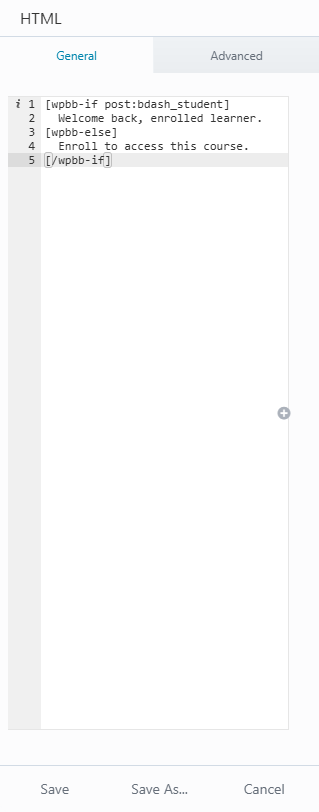
[wpbb-if post:bdash_student]
  Welcome back. Continue where you left off.
[wpbb-else]
  Enroll to access all course content.
[/wpbb-if]
bdash_student returns true when the user is logged in and enrolled in this course.
3. Show a completion message after the course is finished
[wpbb-if post:bdash_course_completed]
  You completed this course. View your [certificate here].
[/wpbb-if]
bdash_course_completed returns true when the current user has marked all required items complete.
Common conditional connections
| Connection key | True when |
|---|---|
bdash_visitor | User is not logged in or not enrolled |
bdash_student | User is logged in and enrolled |
bdash_course_started | User has started but not completed the course |
bdash_course_completed | User has completed the course |
bdash_drip_future | Lesson is scheduled but not yet available |
bdash_drip_past | Lesson's drip date has passed |
bdash_can_progress | User can progress past this item |
bdash_cannot_progress | User cannot progress yet (video or timer gate active) |
For the full list, see Conditions Reference.
What you've accomplished
You can now show and hide sections of any layout based on who the learner is and where they are in the course. This pattern is used throughout real LearnDash site builds — for enrollment prompts, progress messages, certificate links, and content gates.