How to Sell a License Through WooCommerce
Create a WooCommerce product that sells a MemberSync license granting access to specific LearnDash content.
Before you start: WooCommerce and WooCommerce Subscriptions must be active (the license product fields require Subscriptions). You need at least one LearnDash course.
Steps
- Go to Products > Add new and give the product a name.
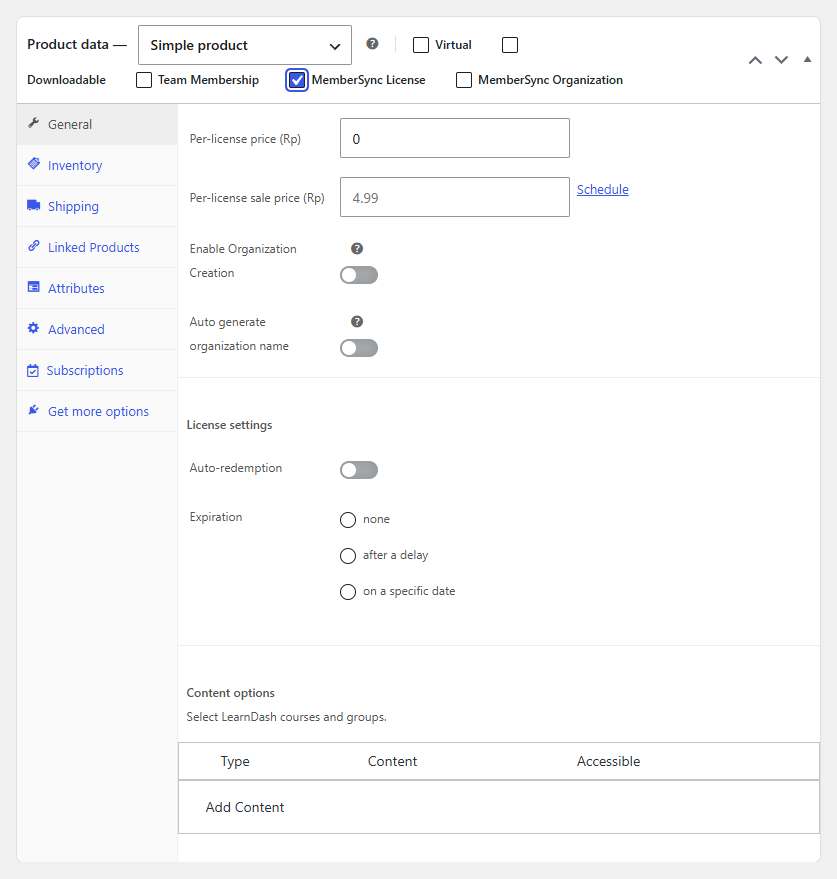
- In the Product data panel, enable MemberSync License.
- On the General tab, set the Per-license price (and a sale price if you want one).
- Choose an Expiration for the license: none, after a delay, or on a specific date.
- Under Content options, select Add Content and add a rule:
- Type: Course, Course Category, or Group
- Content: the course(s), category, or group to grant
- Accessible: Immediate, after a delay, or on a specific date
- (Optional) Enable Enable Organization Creation if buying this license should also create an organization for the buyer.
- Publish the product.
Result
Customers who purchase this product receive a license granting the LearnDash access you configured. If you enabled organization creation, an organization is created for the buyer as well.