5.2 Drip Lessons
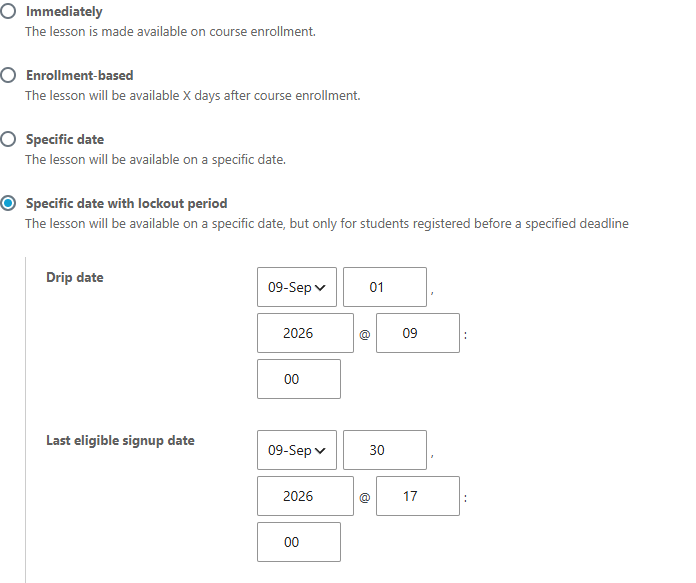
The Drip Lessons feature adds a fourth option to each lesson's release schedule: the lesson becomes available on a drip date you choose, but only for students who registered before a last eligible signup date. Later signups are locked out of that drip, which keeps scheduled cohorts together.
LearnDash itself offers lesson release "immediately", a set number of days after enrollment, or on one specific date for everyone. Drip Lessons adds the cohort-aware variant.
Enable the feature
- Go to Settings > Tweaks for LearnDash.
- Tick Drip Lessons and click Save Changes.
Set up a dripped lesson
- Edit the lesson and open its Settings tab.
- In Display and Content Options, find the Lesson Release Schedule setting.
- Choose Specific date with lockout period, the option added by this feature. Its description reads: "The lesson will be available on a specific date, but only for students registered before a specified deadline."
- Set the two dates:
- Drip date is when the lesson becomes available.
- Last eligible signup date is the registration cutoff; students who signed up before this date receive the drip.
- Update the lesson.
What learners see
Before the drip date, eligible learners see the lesson in the course list, but opening it shows an availability notice instead of the content and the Mark Complete button:
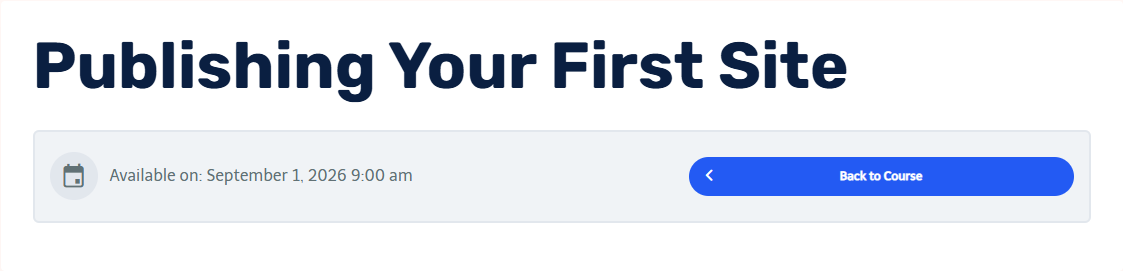 Before the drip date, the lesson page shows when it opens.
From the drip date onward, the lesson behaves like any other.
How the options compare
| Release option | Who gets access, and when |
|---|---|
| Immediately | Everyone, on enrollment |
| Enrollment-based | Each student, X days after their own enrollment |
| Specific date | Everyone, on one date |
| Specific date with lockout period | Students registered before the signup cutoff, on the drip date |
Notes
- Dates apply per lesson, so you can stagger a course's lessons week by week for a cohort.
- Drip Lessons controls when a lesson is available; it does not change completion-order rules. To let learners take available lessons in any order, combine it with Independent Lesson Completion.