Quiz Dynamic Tags
Quiz Dynamic Tags
These tags are listed under LifterElements: Quiz in the Elementor dynamic tag picker. They read from the quiz being viewed, so they only produce output on a quiz page: in practice, inside an Elementor Theme Builder template that applies to quizzes, alongside the Quiz widget. Added in 1.8.0.
Each tag prints what LifterLMS's own quiz page prints for the same data, and nothing where LifterLMS shows nothing: a field that depends on the student is empty for a visitor who is not logged in, and the attempt tags are empty until the student has taken the quiz.
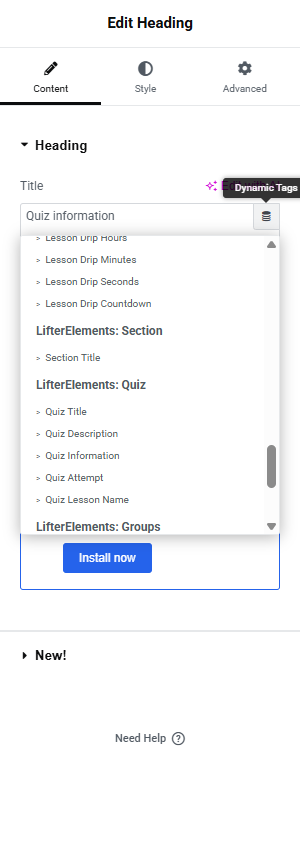
Type tells you which controls accept the tag: Text tags appear in text controls (Heading, Text Editor, button text, and similar); URL tags appear in link controls (a Button link, an image link).
Quiz Title
Returns the quiz's title.
Type: Text · Source: the quiz's title · Settings: none
Quiz Description
Returns the quiz's own content as written in its editor, formatted like post content (paragraphs, blocks and embeds included) and without the quiz interface LifterLMS adds to the page. Empty when the quiz has no content.
Type: Text · Source: the quiz's editor content · Settings: none
Use it when — a Text Editor widget should carry the quiz's introduction in your own position and style, with the Quiz widget's Description part removed from its Overview Items.
Quiz Information
Returns one field from the quiz's settings, as the quiz page's information list shows it.
Type: Text · Source: Quiz Settings in the course builder · Settings:
| Setting | Options | Default | Description |
|---|---|---|---|
| Field | Passing Grade, Allowed Attempts, Remaining Attempts, Attempts Taken, Questions, Time Limit | Passing Grade | Passing Grade returns the minimum passing grade (for example 65%). Allowed Attempts returns the attempt limit, or Unlimited. Remaining Attempts and Attempts Taken count the logged-in student's attempts and are empty for a visitor. Questions returns the number of questions. Time Limit returns the limit as LifterLMS words it (for example 10 minutes), or nothing when the quiz has no limit. |
Quiz Attempt
Returns one value from the logged-in student's attempts at the quiz. Empty for a visitor; Status is the one field with a value before any attempt.
Type: Text · Source: the student's quiz attempts · Settings:
| Setting | Options | Default | Description |
|---|---|---|---|
| Field | Best Grade, Last Grade, Status, Correct Answers, Completed Date, Total Time | Last Grade | Best Grade and Last Grade return a percentage (for example 100%); Last is the latest finished attempt. Status returns the latest attempt's status as LifterLMS words it (Pass, Fail, Pending, Incomplete), or Not taken. Correct Answers returns the latest finished attempt's score as answered over total (for example 2 / 3). Completed Date returns the date of the latest finished attempt. Total Time returns how long it took, as LifterLMS words it (for example 30 seconds). |
| Date Format | Site Default, Y-m-d, F j, Y, m.d.y, j, n, Y, D M j G, Custom Format | Site Default | Format of Completed Date. Site Default uses the WordPress date and time format; Custom Format reveals Custom Date Format, a PHP date format string. Shown only for Completed Date. |
Use it when — a results banner on the quiz template should greet a returning student with their best grade, or a "Not taken" / "Pass" label should sit beside the start button. Pair with conditional logic to show the banner only to enrolled students.
Quiz Review URL
Returns the URL of the student's latest finished attempt's results (the quiz page with that attempt selected), the same link LifterLMS's quiz-completion email carries. Empty for a visitor and before the first finished attempt, so a Button bound to it has no destination rather than a wrong one.
Type: URL · Source: the latest finished attempt · Settings: none
Quiz Lesson Name
Returns the title of the lesson the quiz belongs to, the lesson LifterLMS's Return to Lesson link points to.
Type: Text · Source: the quiz's parent lesson · Settings: none
Quiz Lesson URL
Returns the URL of the lesson the quiz belongs to.
Type: URL · Source: the quiz's parent lesson · Settings: none
Use the lesson tags when — you want your own "Back to the lesson" element instead of the Quiz widget's Return to Lesson part: a Button whose link is Quiz Lesson URL and whose text is Quiz Lesson Name.
Notes
- Course and lesson tags do not resolve on a quiz page; the quiz tags are the way to reach the parent lesson from a quiz template. The lesson's parent course has no quiz tag yet.
- The quiz tags have no shortcode equivalents.
- Visitors who may not take the quiz never reach the page: LifterLMS redirects them before the template renders, so there is no "not enrolled" state to design for on the quiz template itself.