Course Dynamic Tags
Course Dynamic Tags
These tags appear under the LifterElements: Course group in Elementor's dynamic tag picker. They read from the current course: on a course page, or on a lesson page, where the lesson's parent course is resolved automatically. Outside those two contexts they return nothing.
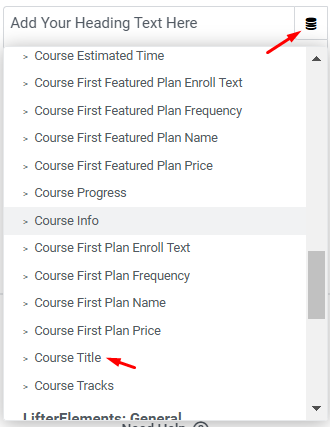
How to apply a dynamic tag
Click the Dynamic Tags icon next to a control that supports it, then pick the tag from the LifterElements: Course group. Which tags are offered depends on the control: Text tags appear on text, textarea, and rich-text controls (a Heading title, a Text Editor, a Button label); URL tags appear on link controls (a Button link, a Video source); the Image tag appears on image controls (the Image widget, a background image). Tags that have settings show a small wrench icon after they are applied. Click it to open them. For the mechanics of dynamic content in general, see Elementor's dynamic content help.
Course Title
Returns the course title.
Type: Text · Source: the course's title in the course editor · Settings: none
Course Content
Returns the course description as written in the block editor, with any LifterLMS blocks (syllabus, pricing table, and so on) removed so only your own content is returned.
Type: Text (HTML) · Source: the course editor's main content area · Settings: none
Use it when — a lesson template should repeat the course overview. Do not bind it inside the course's own content: it would render itself.
Course Categories
Returns the course's categories as a comma-separated list of links to each category archive.
Type: Text (HTML) · Source: the Course Categories panel in the course editor sidebar · Settings: none
Course Tracks
Returns the course's tracks as a comma-separated list of links to each track archive. Empty if the course is not assigned to a track.
Type: Text (HTML) · Source: the Tracks panel in the course editor sidebar (tracks are created under LifterLMS > Course Tracks) · Settings: none
Course Difficulty
Returns the difficulty level set for the course. Empty if none is set.
Type: Text · Source: the Difficulty setting in the course editor · Settings: none
Course Estimated Time
Returns the Course Length value, the free-text estimate the course author entered, such as "4 weeks". Empty if none is set.
Type: Text · Source: Course Options > Course Length · Settings: none
Course Lesson Count
Returns the total number of lessons in the course, across all sections, as a bare number such as 12.
Type: Text · Source: calculated from the course's syllabus · Settings: none
Course Information
Returns one structured course setting chosen in the tag's settings: an enrollment date, a capacity value, a restriction message, and so on.
Type: Text · Source: the Course Options meta box (restriction, enrollment, and capacity fields) · Settings: Field, Date Format, Custom Date Format
| Setting | Description |
|---|---|
| Field | Which setting to return. Options: Capacity, Capacity Message, Content Restricted Message, Course Closed Message, Course Opens Message, Enable Capacity, Enrollment Closed Message, Enrollment End Date, Enrollment Opens Message, Enrollment Period, Enrollment Start Date, End Date, Has Prerequisite, Prerequisite, Prerequisite Track, Start Date (default), Length, Time Period. |
| Date Format | Shown only for the four date fields (Enrollment Start Date, Enrollment End Date, Start Date, End Date). Options: Y-m-d (default), F j, Y, m.d.y, j, n, Y, D M j G, or Custom Format. |
| Custom Date Format | Shown when Date Format is set to Custom Format. A PHP date format string, for example d/m/Y. |
Use it when — a course header needs a specific enrollment or schedule value ("Enrollment closes March 31") rather than the free-text length or the prose description.
Course Featured Image
Returns the course's featured image. Returns nothing if the course has no featured image.
Type: Image · Source: the Featured image panel in the course editor sidebar · Settings: none
Course Audio
Returns the URL of the course's audio embed. Empty if none is set.
Type: URL · Source: Course Options > Audio Embed URL · Settings: none
Course Video
Returns the URL of the course's video embed. Empty if none is set.
Type: URL · Source: Course Options > Video Embed URL · Settings: none
Use the two media URL tags when — you want the course's audio or video in a player of your choosing (an Elementor Video widget's source, or a Button link) instead of the Lifter Elements Course Video and Course Audio widgets.
Course Progress
Returns the logged-in student's progress through the course, either as a percentage or as a lesson count.
Type: Text · Source: calculated from the student's completed lessons · Settings: Type
| Setting | Description |
|---|---|
| Type | Percentage (default) returns the progress with the % sign, for example 45%; 0% for students who have not started and for logged-out visitors. Steps returns completed lessons over total lessons, for example 3 / 12. |
Use it when — writing progress into copy ("You're 45% of the way through"). For a visual bar, use the Course Progress widget instead.
Featured plan tags
LifterLMS lets a course have several access plans, each with a Visibility setting. The five featured-plan tags read from the first plan marked Featured, in the order the plans appear in the course editor. All five read from Course Options > Access Plans.
Use them when — you curate one headline plan per course by marking it Featured and want its name, price, or checkout link on a Heading, Text Editor, or Button. Choose the first-plan tags (below) when courses have a single plan or you always want whichever plan is listed first.
If none of the course's access plans has its Visibility set to Featured, all five tags are empty.
Course First Featured Plan Name
Returns the plan's name.
Type: Text · Source: the plan's Plan Title · Settings: none
Course First Featured Plan Price
Returns the plan's price with currency symbol. If the plan is on sale, the sale price is returned instead. A free plan returns the word FREE.
Type: Text (HTML) · Source: the plan's Price (and Sale Price, if on sale) · Settings: none
The regular price is wrapped in LifterLMS's price markup (<span class="lifterlms-price">…</span>), so it picks up your theme's price styling; a sale price is returned as plain text such as $80.
Course First Featured Plan Frequency
Returns the plan's billing frequency as LifterLMS displays it, for example per month for 12 total payments for a subscription. Empty for a one-time payment plan.
Type: Text · Source: the plan's Frequency · Settings: none
Course First Featured Plan Enroll Text
Returns the plan's Enroll Button Text, the label LifterLMS puts on the plan's enroll button. Returns Enroll when the plan has no custom text.
Type: Text · Source: the plan's Enroll Button Text · Settings: none
Course First Featured Plan URL
Returns the plan's checkout URL, so you can build your own enroll button.
Type: URL · Source: the plan's checkout link, generated by LifterLMS · Settings: none
First plan tags
The five first-plan tags work exactly like their featured-plan counterparts, but read from the first access plan in the course editor's order regardless of its Visibility setting. They return nothing if the course has no access plans.
Course First Plan Name
Type: Text · Source: the plan's Plan Title · Settings: none
Course First Plan Price
Returns the price with currency symbol; the sale price if the plan is on sale; FREE for a free plan. Same markup as the featured-plan version.
Type: Text (HTML) · Source: the plan's Price (and Sale Price, if on sale) · Settings: none
Course First Plan Frequency
Empty for a one-time payment plan.
Type: Text · Source: the plan's Frequency · Settings: none
Course First Plan Enroll Text
Returns Enroll when the plan has no custom text.
Type: Text · Source: the plan's Enroll Button Text · Settings: none
Course First Plan URL
Returns the plan's checkout URL.
Type: URL · Source: the plan's checkout link, generated by LifterLMS · Settings: none
Notes
- Every course tag has an equivalent shortcode for use outside Elementor: in the block editor, theme widgets, or other page builders.
- The two plan-ID values (
le-courses-featured-plan-id,le-courses-plan-id) exist only as shortcodes; there is no dynamic tag for them.