Offer a PDF Download on a Lesson
Goal: learners open a lesson, click the Materials tab, and download your slides as a PDF.
You need: LearnDash and LearnDash Materials Extended installed and active, and a lesson to attach the file to.
1. Upload the PDF
In the WordPress admin, go to Media > Add New Media File and upload the PDF. You can also upload it from inside the material's file picker in the next step; uploading first just keeps things tidy if you have several files.
2. Add the material to the lesson
- Edit the lesson and open the Settings tab.
- Under Display and Content Options, switch Lesson Materials on.
- Click Add item.
- Title: what learners will click, for example
Lesson slides (PDF). - Leave Source on From Media Library and click Select. In the media window, open the Media Library tab, click your PDF, and click Select. The filename appears next to the button.
- Leave Link action on Download. This links straight to the file, so the browser downloads it or opens it in its PDF viewer, and gives the item the PDF icon.
- Optionally tick Open in new tab so the lesson stays open behind the file.
- Click Insert shortcode if the materials editor above the items is empty.
- Save the lesson.
3. Check it as a learner
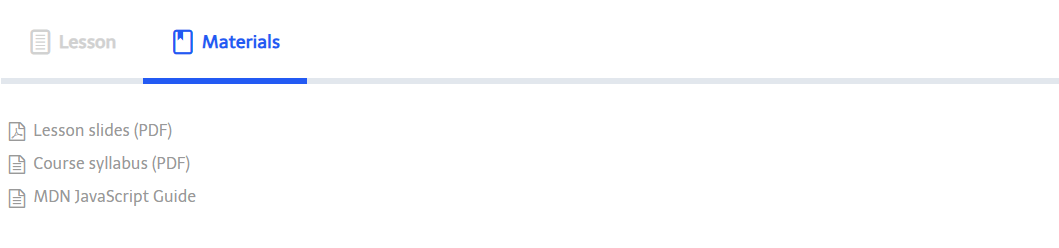
Open the lesson on the front end and click the Materials tab. Your PDF is listed with a PDF icon. Click it to confirm the file opens or downloads.
Variations
- Several files on one lesson: repeat Add item for each. Drag items to set the order.
- A file that lives elsewhere (a shared drive, another site): set Source to External URL and paste the full
https://link. Whether the browser downloads or opens it depends on the other site. - Link to the file's WordPress page instead of the file: choose Attachment page as the link action. Note that the item then shows the generic document icon, because the link no longer ends in
.pdf. - Show the same list in the lesson content too: add a Shortcode block containing
[learndash_materials_extended]to the lesson body. See 5.2 The Materials Shortcode.